Import
STEP, PDF, quantity, and associated reference documents.
Local, Explainable, and Rule-Compliant CNC Quoting.
QuantCAD-Hybrid transforms STEP models, PDF drawings, and shop data into a coherent technical dossier. The application helps the team verify geometry, tools, fixtures, time, risk, and cost structure before submitting the quote.
REQUEST DEMONSTRATION →Licences from EUR 1,500 excl. VAT. See licensing options and commercial terms.
COMPLETE RFQ FLOW
STEP, PDF, quantity, and associated reference documents.
Geometry, drawing, material, tolerances, and missing information.
Machine, setups, orientations, tools and candidate strategies.
Time, semifinished product, consumptions, external operations, and cost.
Risks, contradictions, level of confidence, and validation points.
Documented quote, export, and production preparation information.
TECHNICAL CONTEXT DECISIONS
QuantCAD can separate the central P50 scenario from the prudent variants P80 and P95. These intervals describe the uncertainty of the data and the process; they do not represent a contractual guarantee. The technologist retains control over the final validation.
STEP models can be associated with NC programs and measured times. Local memory is updated only after explicit confirmation of real data.
History is segmented by process, material and machine. Outliers are constrained, and reference records can be audited or withdrawn.
Implementation can begin with 20-30 representative references, compared with NC programs and real times before commercial rules are approved.
Client-delivered version, modules, and configuration capabilities are confirmed.
LOCAL CONFIGURATION
| Component | Minimum accepted | Recommended |
|---|---|---|
| Operating system | Windows 10/11 x64 | Windows 11 Pro x64 |
| RAM memory | 16 GB | 32 GB for large batches and documents |
| Processor | Modern x64 processor | 8-12 fast cores |
| Storage | 12 GB free | Minimum 50 GB on SSD; NVMe for large projects and archives |
| Video card | Not required | Optional dedicated GPU for 3D visualization |
The AI model included runs on the processor. The system reserves memory for Windows and can stop the AI module when free memory is insufficient.
EXPLAINABLE CNC QUOTING
QuantCAD Hybrid Industrial is a desktop application for CNC shops and quoting teams that receive references in STEP, PDF drawings, and distributed technical requirements across multiple documents. The system gathers information in a single local flow, maintains the link between technical proofs and commercial calculations, and shows the hypotheses used for each reference.
The application does not treat the quote as just a final price. It builds a technical dossier where geometry, material, tolerances, tools, fixtures, operations, estimated time, and risks can be reviewed before the team approves the pricing.
Automatically associates STEP/STP files with PDF drawings, maintains the revision and source of each document, and highlights missing, duplicate, or ambiguous associations.
Extracts geometric features, reads relevant information from the drawing, and marks contradictions between the 3D model and the manufacturing intent described in the PDF.
Compares part dimensions and orientation with tool envelope, verifies fixture access, and correlates material, fixture catalog, and company-approved technological rules.
Separates cutting, rapid moves, entry and exit, fixture changes, indexing, and auxiliary activities. The estimate remains visible and can be compared with actual production time.
Gathers semifinished products, programming, setup, cycle time, tool and operator rates, energy, fixtures, external operations, control, scrap, yield, risk, and margin.
OCR, STEP analysis, databases, and AI assistant run locally. The described flow does not require an API key and does not implicitly send technical documents to cloud services.
COMPLETE RFQ FLOW
STEP, PDF, quantity, and associated reference documents.
Geometry, drawing, material, tolerances, and missing information.
Machine, setups, orientations, tools and candidate strategies.
Time, semifinished product, consumptions, external operations, and cost.
Risks, contradictions, level of confidence, and validation points.
Documented quote, export, and production preparation information.
TECHNICAL CONTEXT DECISIONS
QuantCAD can separate the central P50 scenario from the prudent variants P80 and P95. These intervals describe the uncertainty of the data and the process; they do not represent a contractual guarantee. The technologist retains control over the final validation.
STEP models can be associated with NC programs and measured times. Local memory is updated only after explicit confirmation of real data.
History is segmented by process, material and machine. Outliers are constrained, and reference records can be audited or withdrawn.
Implementation can begin with 20-30 representative references, compared with NC programs and real times before commercial rules are approved.
Client-delivered version, modules, and configuration capabilities are confirmed.
LOCAL CONFIGURATION
| Component | Minimum accepted | Recommended |
|---|---|---|
| Operating system | Windows 10/11 x64 | Windows 11 Pro x64 |
| RAM memory | 16 GB | 32 GB for large batches and documents |
| Processor | Modern x64 processor | 8-12 fast cores |
| Storage | 12 GB free | Minimum 50 GB on SSD; NVMe for large projects and archives |
| Video card | Not required | Optional dedicated GPU for 3D visualization |
The AI model included runs on the processor. The system reserves memory for Windows and can stop the AI module when free memory is insufficient.
SEE THE PROGRAM IN ACTION
Watch the presentation on YouTube ↗
EXAMPLE OF INDUSTRIAL USE
In an industrial supply cycle they were imported simultaneously 3,500 STEP benchmarks and related Excel file, obtaining a price quote in 25 minutes.
Result communicated by DINAMIC PRO EA SRL for this lot; the duration depends on the complexity of the models, input data and computer configuration.
INSTALLATION AND ACTIVATION
The video clip presents the installation of QuantCAD-Hybrid and the main steps for preparing the application. The license is activated separately for each authorized computer, and system configuration is verified before installation.
Follow the installation instructions on YouTube ↗
Windows 10/11 x64, minimum 16 GB RAM and the required free space of the kit. For large batches, 32 GB RAM and SSD storage are recommended.
Use the files provided by DINAMIC PRO EA, keep the kit volumes together, and verify their integrity before installation.
Launch the installer, accept the usage agreement, and choose the installation folder. Do not move or rename kit volumes during installation.
Import the license file .qlic issued for the authorized device. Licenses for multiple stations are activated separately on each computer.
Confirm access to projects, STEP/PDF visualization, and local module startup. The memory profile adapts to the available configuration.
After activation, the local quoting and viewing workflow requires neither a permanent internet connection nor an external API key.
Interface, kit size, and exact steps may vary between versions. Follow the included installation instructions and seek assistance if activation does not recognize the authorized computer.
FOR THE WORKSHOP AND OFFERING TEAM
The factory receives drawings, 3D models and sometimes incomplete requirements. The estimator needs a coherent file for each milestone. QuantCAD-Hybrid organizes milestones, correlates files, flags missing documents, proposes the process, and prepares the batch for calculation.
Milling and turning, unique pieces and small series.
Batches with STEP, PDF and quality requirements to be analyzed together.
Cost, risk and traceability before tender approval.
The goal: fewer omissions before the firm offer and a clear link between technical analysis and quotation.
LIBRARY OF MARKETS AND REAL TIMES
The STEP library is used to have a benchmark and a basis of comparison for future offers. Models and real times from production history provide context for estimating new parts.
| Elements | Limit / behavior |
|---|---|
| STEP files per import | Maximum 499,999 STEP files. At 500,000, the selection is rejected. |
| Size per STEP file | Maximum 100MB. |
| Excel / CSV with real times | Maximum 100MB. |
| SQLite database | It does not have a fixed milestone limit implemented; the real limit is available disk space. |
| Reimport of the same landmark | If the identity is the same, the record is updated, without unnecessary duplication. |
The "15 saved examples" in the library capture represents the number of records that exist at that time, not the limit of the library. The 500,000 threshold is a theoretical limit per selection, not a guaranteed capacity on any PC; the maximum accepted is 499,999.
Processing is sequential to avoid filling RAM.
DYNAMIC TIME INTELLIGENCE
The proposed flow for DYNAMIC Time Intelligence starts from a button that would open a window independent of the main program, dedicated to STEP import and manufacturing history.
The proposed basic structure maintains four columns:
| A | B | C | d |
|---|---|---|---|
| landmark | Programming time | Real time machine | Material |
Optionally, the history can be extended with the following information:
| Column | Information |
|---|---|
| E | Car |
| F | No. in pieces |
| G | Setup |
| H | No. catching |
| and | No. operations |
| J | Actual measured time |
| K | Observations |
| Additional columns | Consumables (drills, cutters, etc.) and price per piece |
The more relevant and accurate production information is entered, the more accurately the engine can base its estimates.
The proposed analysis is not limited to the volume of the piece. For each STEP, the engine would extract a "Geometric DNA", with an extensive set of potentially several hundred parameters:
In a new offering, the engine would combine geometric analysis with the times of similar benchmarks already executed. The estimate would thus go beyond a simple relationship of the type "Volume = X → 73 minutes".
Illustrative comparison example for a new STEP:
| Historical landmark | LIKE | appointment | Car time |
|---|---|---|---|
| 18432 | 87,4% | 42 min | 116 min |
| 19771 | 82,1% | 38 min | 108 min |
| 20554 | 79,8% | 47 min | 121 min |
Combining these comparisons with geometric analysis, the result might be:
The values above illustrate the proposed result; is not a guaranteed measurement or accuracy.
An estimate accompanied by comparable parts, a probable range, and a confidence level provides more context for bidding than a single time value.
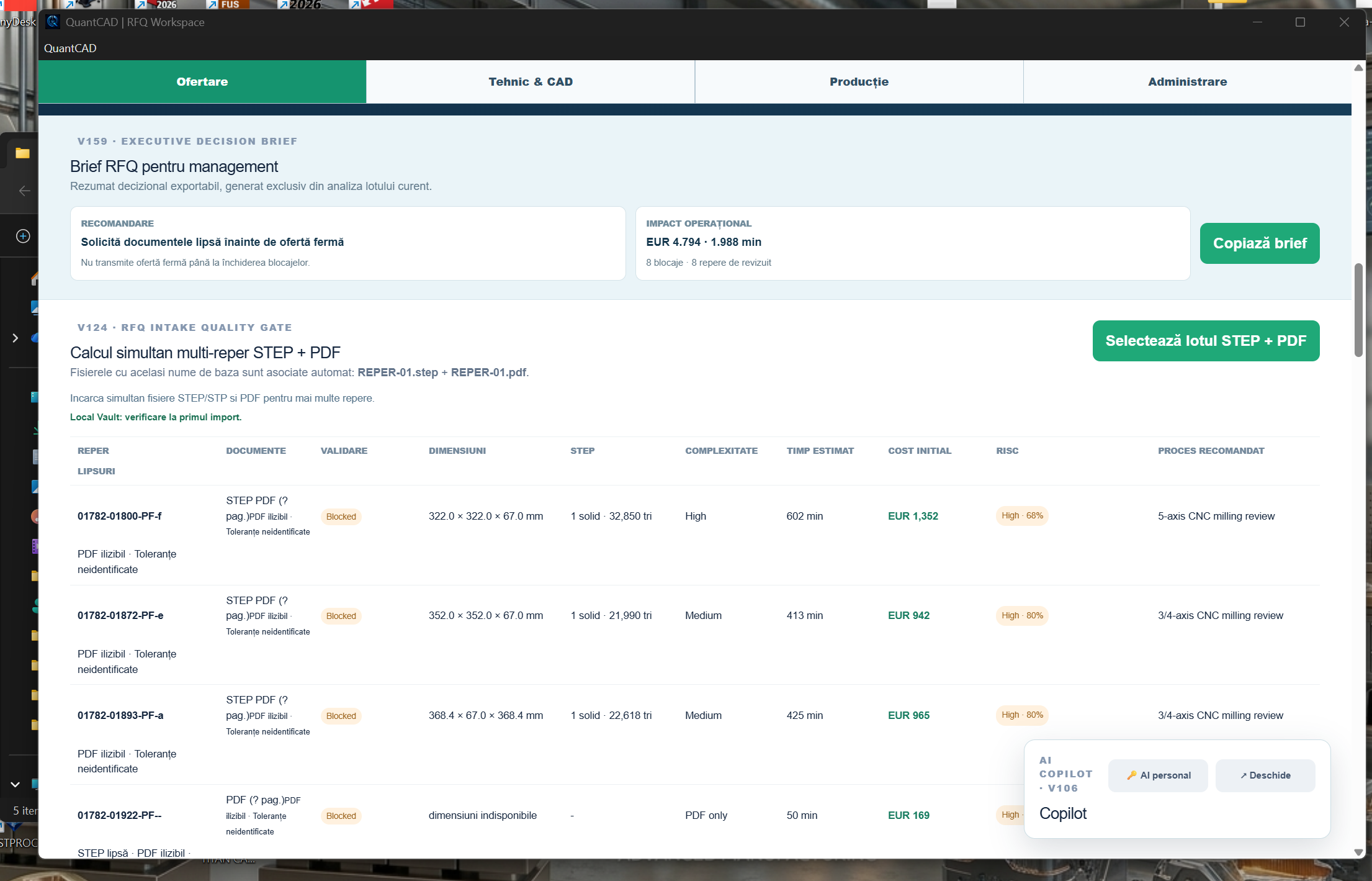
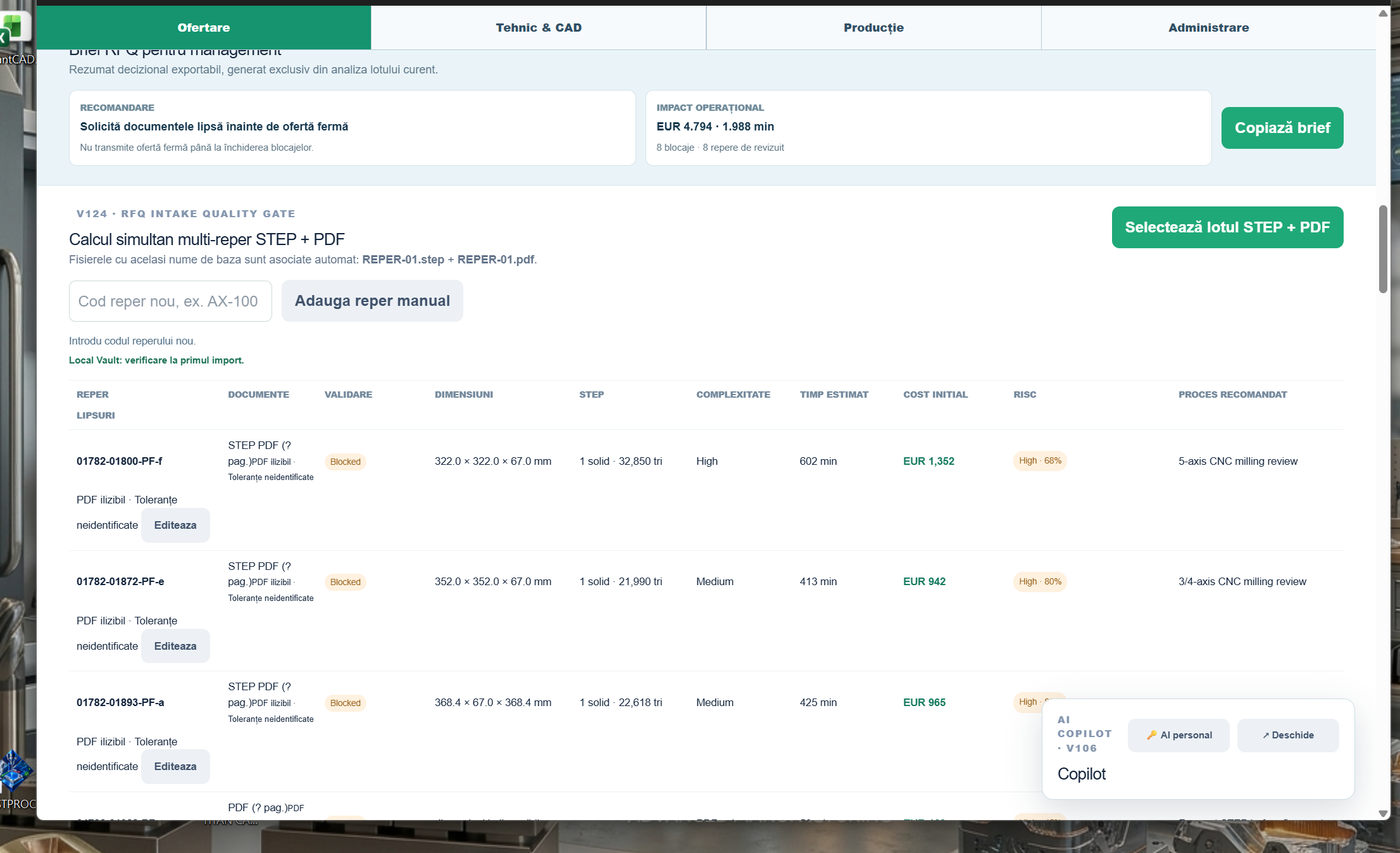
01 · RFQ WORKSPACE
The process begins with the association of documents and continues with the analysis of each milestone. Technical information remains linked to the commercial quotation.
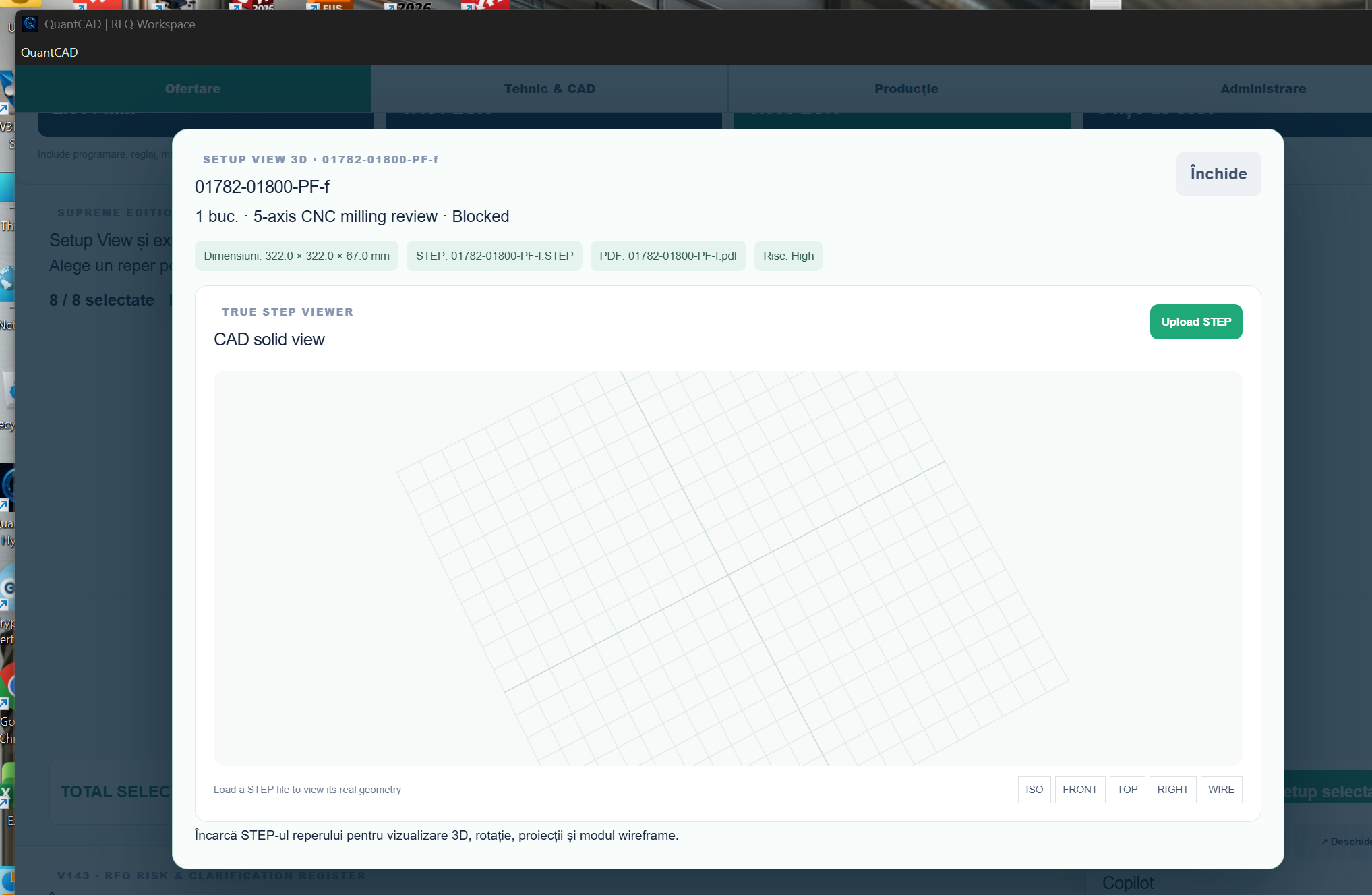
02 · SETUP VIEW
When selecting a landmark, the operator opens a separate sheet with the 3D model, dimensions, associated documents, risk and view modes. The sheet helps with quick lot review and technical clarifications prior to quotation.
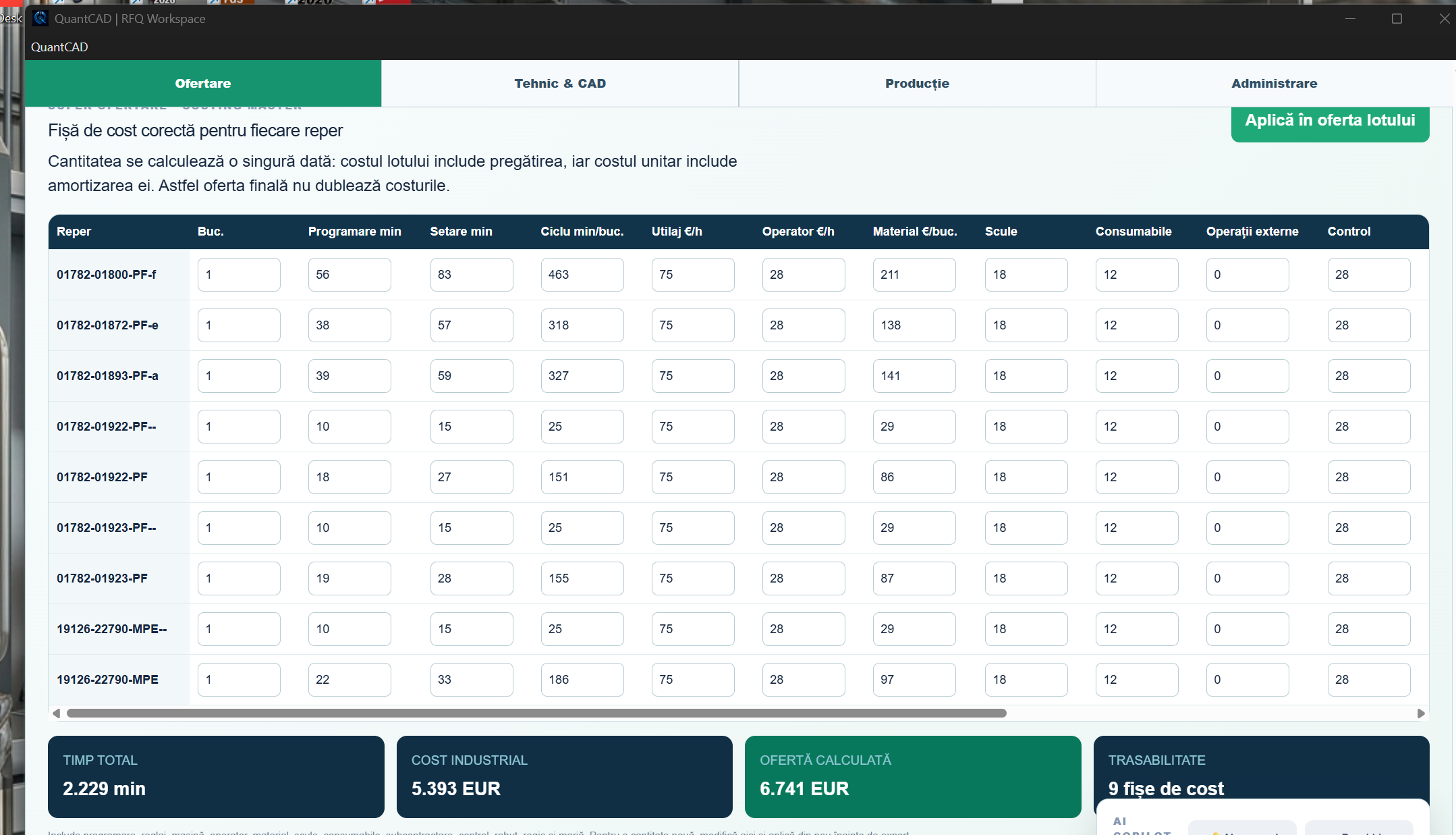
03 · MASTER COSTING
The estimator adapts times, rates, material, external operations, and margin to machinery and factory rules. The cost sheet remains editable and the analysis is not limited to a final total.
| Component | Calculation parameters |
|---|---|
| Training | Programming and setting |
| Execution | Cycle time, machine and operator |
| Acquisitions and Operations | Material, tools, supplies and external operations |
| Quality and financial control | Control, rejection, direction and margin |
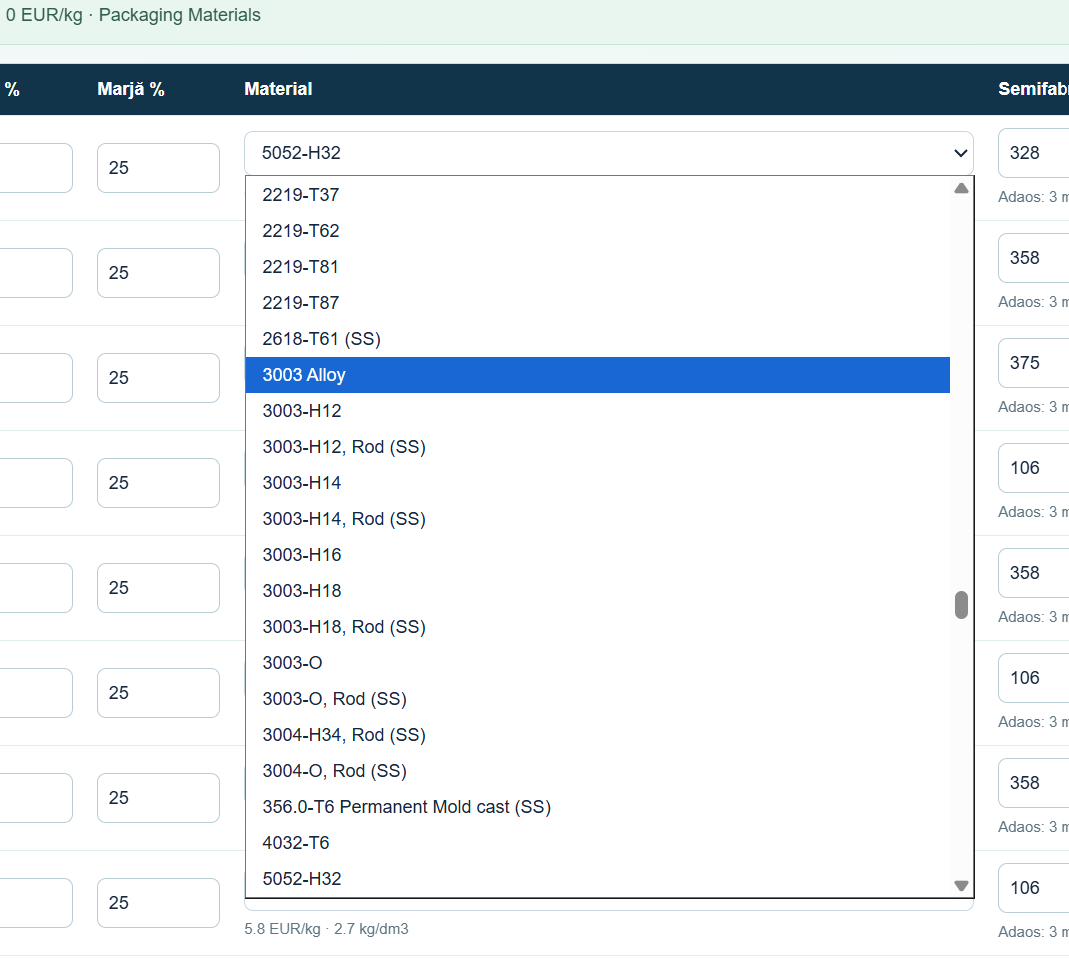
04 · MATERIALS AND SEMI-FABRICATED PRODUCTS
The purchase price and availability of the material is confirmed with the supplier before the final quotation is issued.
05 · PROJECTS AND REVISIONS
After the calculation, the team can save the project, go back on a batch, reset the current batch, add new benchmarks and start a new analysis. The batch remains editable before the quotation is issued.
Cost sheets support historical tracking and reuse of checked parameters. The feed reduces the risk of losing the data of an already revised quote.
06 · DESKTOP IMPLEMENTATION
The customer installs the desktop application and activates the license on the authorized device. For everyday use, the application does not require a server login. RFQ data and analysis rules remain in the customer's local environment.
The local copilot uses RFQ rules, proofs, and context, with no external API key.
The license binds to the device through the file .qlic and can be issued for a fixed or perpetual period.
07 · LICENSING AND PRICING
Prices apply to one licence installed on one authorised Windows computer and exclude VAT. All licence options include the same feature set described in this presentation.
| Licence | Total price excl. VAT | Right of use |
|---|---|---|
| 1 year | 1,500 EUR | 12 months from activation |
| 3 years | 4,000 EUR | 36 months from activation |
| Permanent | 4,500 EUR | No expiry for the purchased version |
| Annual maintenance | 500 EUR / workstation / year | Maintenance service; billed separately |
Annual maintenance is available at EUR 500 per licensed workstation per year, excl. VAT. Initial installation and configuration, training, data migration, guaranteed-response-time support, major updates and custom feature development are not included in the licence prices and are agreed separately in writing.
Prices according to the commercial offer dated 12.09.2026, valid until 12.10.2026.
08 · COMMERCIAL POSITIONING
The business presentation provided uses DigiFabster and Paperless Parts as market benchmarks for industrial offering solutions. QuantCAD-Hybrid's positioning emphasizes clear licensing, offline use, and local control of RFQ documents.
Functional and commercial comparisons must be validated for the specific client configuration: number of workstations, modules, integration, services, and implementation. License prices are presented in the licensing section.
09 · CONDITIONS AND VALIDATION
Prices are stated in EUR, excluding VAT. Invoicing may be issued in RON at the National Bank of Romania exchange rate on the invoice date.
The licence is delivered electronically through an installer and activation for the authorised computer. Full payment is required before activation, and the delivery time is confirmed with the order.
DEMONSTRATION AND FACTORY CONFIGURATION
The evaluation package can be configured for workshop flow, machinery and business rules. Talk to DINAMIC PRO EA about demo and implementation.
REQUEST DEMONSTRATION →0773 344 866 · dinamicproea@gmail.com
← Back to software solutions